If you want to remove email from Mozilla Thunderbird, you can easily do it, but if you use POP, the email will only be removed from your Thunderbird email client, and the email will be kept on your mail server.
If you use IMAP settings, then the email will be removed from both your Thunderbird Email Client and Main email server.
1. Open Mozilla Thunderbird.

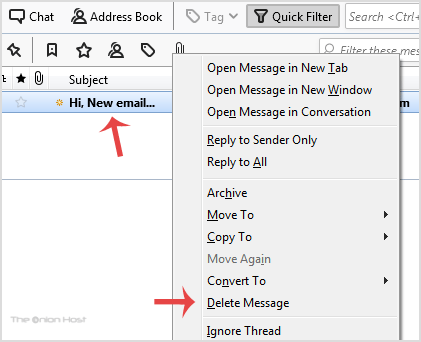
2. Open Inbox and right-click on the email you want to delete and then click on the Delete Message option.
- Home
-
Store
- Browse All
- offshore Shared Hosting
- offshore SSD VPS
- MANAGED offshore VPS
- Windows VPS
- Customizable Dedicated Servers in EU
- Pre-Built OFFSHORE dedicated servers
- Offshore Dedicated Servers
- offshore Streaming Servers
- Netherlands Offshore Dedicated Servers
- Website Builder
- Register a New Domain
- Transfer Domains to Us
- Announcements
- Knowledgebase
- Network Status
- Affiliates
- Contact Us
-
More