You can send email using Thunderbird. It is straightforward because you do not need to manually login to cPanel webmail and you can directly send email using the Mozilla Thunderbird Email Client.
1. Open Mozilla Thunderbird.
2. On the left side of the top menu, click on the Write option. 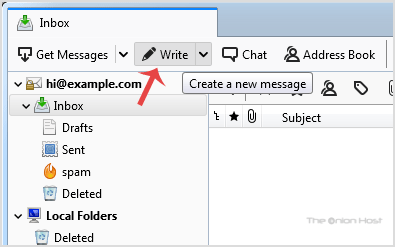
If you have multiple email accounts, click on your account and a drop-down menu will open. Then select the appropriate email and enter the email account of the person you want to send an email to in the To field.
In the subject field, enter the subject of your email, enter your message in the message box, and then click on Send.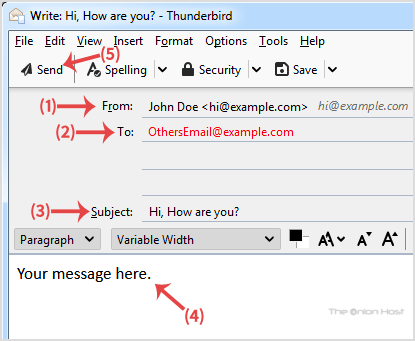
- Home
-
Store
- Browse All
- offshore Shared Hosting
- offshore SSD VPS
- MANAGED offshore VPS
- Windows VPS
- Customizable Dedicated Servers in EU
- Pre-Built OFFSHORE dedicated servers
- Offshore Dedicated Servers
- offshore Streaming Servers
- Netherlands Offshore Dedicated Servers
- Website Builder
- Register a New Domain
- Transfer Domains to Us
- Announcements
- Knowledgebase
- Network Status
- Affiliates
- Contact Us
-
More