BoxTrapper requires all email senders who are not on your whitelist to reply to a verification email before you receive their mail. This protects your inbox from spam.
If you want to get rid of unwanted emails, then you can enable this on all your emails or only on selected emails, and you need to configure BoxTrapper.
1. Login to your cPanel Account,
2. In the Email section, click on the BoxTrapper Icon.

3. From the BoxTrapper Page, you can see a list of your emails under the Account tab and the status of BoxTrapper (enabled/disabled) under the Status tab. Click on the Manage link.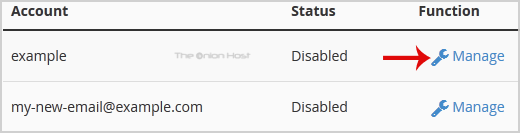
4. On the BoxTrapper Manage Page, if the current status is Disabled, click on the Enable button.
- Home
-
Store
- Browse All
- offshore Shared Hosting
- offshore SSD VPS
- MANAGED offshore VPS
- Windows VPS
- Customizable Dedicated Servers in EU
- Pre-Built OFFSHORE dedicated servers
- Offshore Dedicated Servers
- offshore Streaming Servers
- Netherlands Offshore Dedicated Servers
- Website Builder
- Register a New Domain
- Transfer Domains to Us
- Announcements
- Knowledgebase
- Network Status
- Affiliates
- Contact Us
-
More