You can change the display name of your WordPress account, which shows on a WordPress post or comments without changing your WordPress username.
1. Login to your WordPress admin dashboard.
2. Under the dashboard menu, hover your mouse over Users and then click on Your Profile.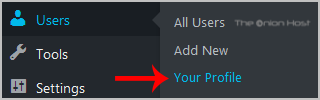
3. Locate Nickname and enter your new name.
4. In the option Display name publicly as, choose your newly added nickname from the drop-down menu.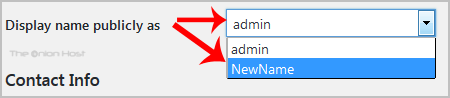
- Home
-
Store
- Browse All
- offshore Shared Hosting
- offshore SSD VPS
- MANAGED offshore VPS
- Windows VPS
- Customizable Dedicated Servers in EU
- Pre-Built OFFSHORE dedicated servers
- Offshore Dedicated Servers
- offshore Streaming Servers
- Netherlands Offshore Dedicated Servers
- Website Builder
- Register a New Domain
- Transfer Domains to Us
- Announcements
- Knowledgebase
- Network Status
- Affiliates
- Contact Us
-
More