If you want to restart your VPS, you can do it via the Command line or SolusVM.
How to reboot/restart your VPS via SolusVM?
1. Login to your SolusVM Control Panel.
2. If you have multiple VPS, select the appropriate one.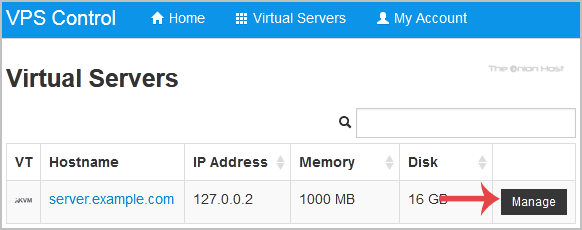
3. Scroll down, and you can see a Reboot option. Click it!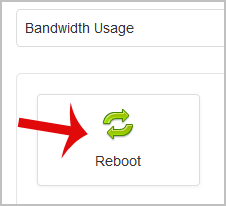
4. It will show a confirmation window. Click on Yes.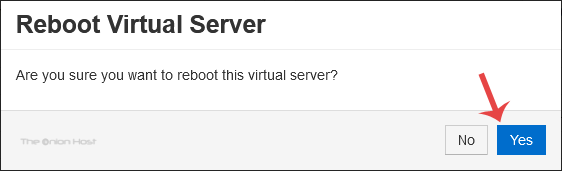
It can take a few seconds or minutes, and when your VPS reboots, it will display a message.
How to reboot/restart your VPS via Command Line?
The best method of rebooting your VPS is via the Command line because it will first stop all processes and then initiate the reboot.
1. Login to your SSH Client.
2. Enter the command shutdown -r now (without the quotes)
Once you execute the command, it may take some time, and then your VPS will reboot. If your VPS does not come online after 5 to 10 minutes, we advise you to reboot your VPS from the SolusVM (the so-called force reboot).
- Home
-
Store
- Browse All
- offshore Shared Hosting
- offshore SSD VPS
- MANAGED offshore VPS
- Windows VPS
- Customizable Dedicated Servers in EU
- Pre-Built OFFSHORE dedicated servers
- Offshore Dedicated Servers
- offshore Streaming Servers
- Netherlands Offshore Dedicated Servers
- Website Builder
- Register a New Domain
- Transfer Domains to Us
- Announcements
- Knowledgebase
- Network Status
- Affiliates
- Contact Us
-
More