1. Log into your SiteWorx account. (eg: www.example.com:2443/siteworx/ )
2. Under SiteWorx Menu, click the Hosting Features menu item if it is not already open.
3. Click the Domain menu item and then click on the Secondary option.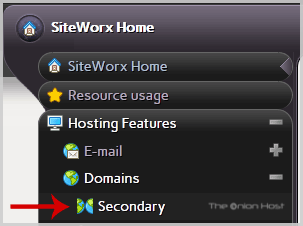
4. Under Existing Domains tab, Select Appropriate domain name you want to delete.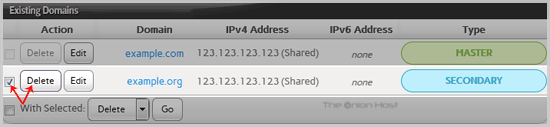
5. Click the Delete button.
6. A confirmation window will appear, Again click on the Delete button.
You should see a success message notifying you that your Secondary domain has been removed.
- Home
-
Store
- Browse All
- offshore Shared Hosting
- offshore SSD VPS
- MANAGED offshore VPS
- Windows VPS
- Customizable Dedicated Servers in EU
- Pre-Built OFFSHORE dedicated servers
- Offshore Dedicated Servers
- offshore Streaming Servers
- Netherlands Offshore Dedicated Servers
- Website Builder
- Register a New Domain
- Transfer Domains to Us
- Announcements
- Knowledgebase
- Network Status
- Affiliates
- Contact Us
-
More