If you don't want to use a 3rd party FTP Software, you can use the SiteWorx's inbuilt File Manager.
1. Log into your SiteWorx account. (e.g. www.example.com:2443/siteworx/ )
2. Under SiteWorx Menu, choose the File Manager option. 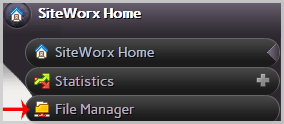
3. Navigate to the directory where you want to upload your files. For example, should you wish to upload your file to the public HTML folder, you need to go to /Html first. On the left side, you can see a list of directories. Double Click on the HTML folder.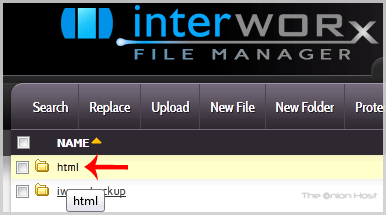
4. Click on the Upload menu in the Top header section, click on the Browse button and select the file you want to upload from your PC. After you have selected the file, click on the Upload button to upload it.
- Home
-
Store
- Browse All
- offshore Shared Hosting
- offshore SSD VPS
- MANAGED offshore VPS
- Windows VPS
- Customizable Dedicated Servers in EU
- Pre-Built OFFSHORE dedicated servers
- Offshore Dedicated Servers
- offshore Streaming Servers
- Netherlands Offshore Dedicated Servers
- Website Builder
- Register a New Domain
- Transfer Domains to Us
- Announcements
- Knowledgebase
- Network Status
- Affiliates
- Contact Us
-
More